Apply the same checks across notes
Use your agency’s program criteria to flag missing contact details, unclear follow-up, or repetitive language worth a second look.
For Minnesota Medicaid waiver agencies
Keep your electronic health record (EHR) and give supervisors a better way to review notes. One Care Portal checks exported PDFs against your agency’s criteria, shows reviewers the evidence, and leaves the final decision with your team.
HIPAA safeguards & BAA available · Configurable review criteria · Human-reviewed findings
Minnesota waiver case managers document contacts, coordinate services, and monitor supports. When those records span different forms or systems, it takes time to find what’s missing and show staff where to make a correction.
Use your agency’s program criteria to flag missing contact details, unclear follow-up, or repetitive language worth a second look.
Open a finding beside the source PDF. Review the quoted text and page reference when evidence is available.
Export a readable PDF and review it in One Care Portal. Staff can continue writing and correcting notes in the system they already use.
Confirm, dismiss, or resolve suggested findings, then record the outcome and see which issues recur.
Standalone Compliance Review
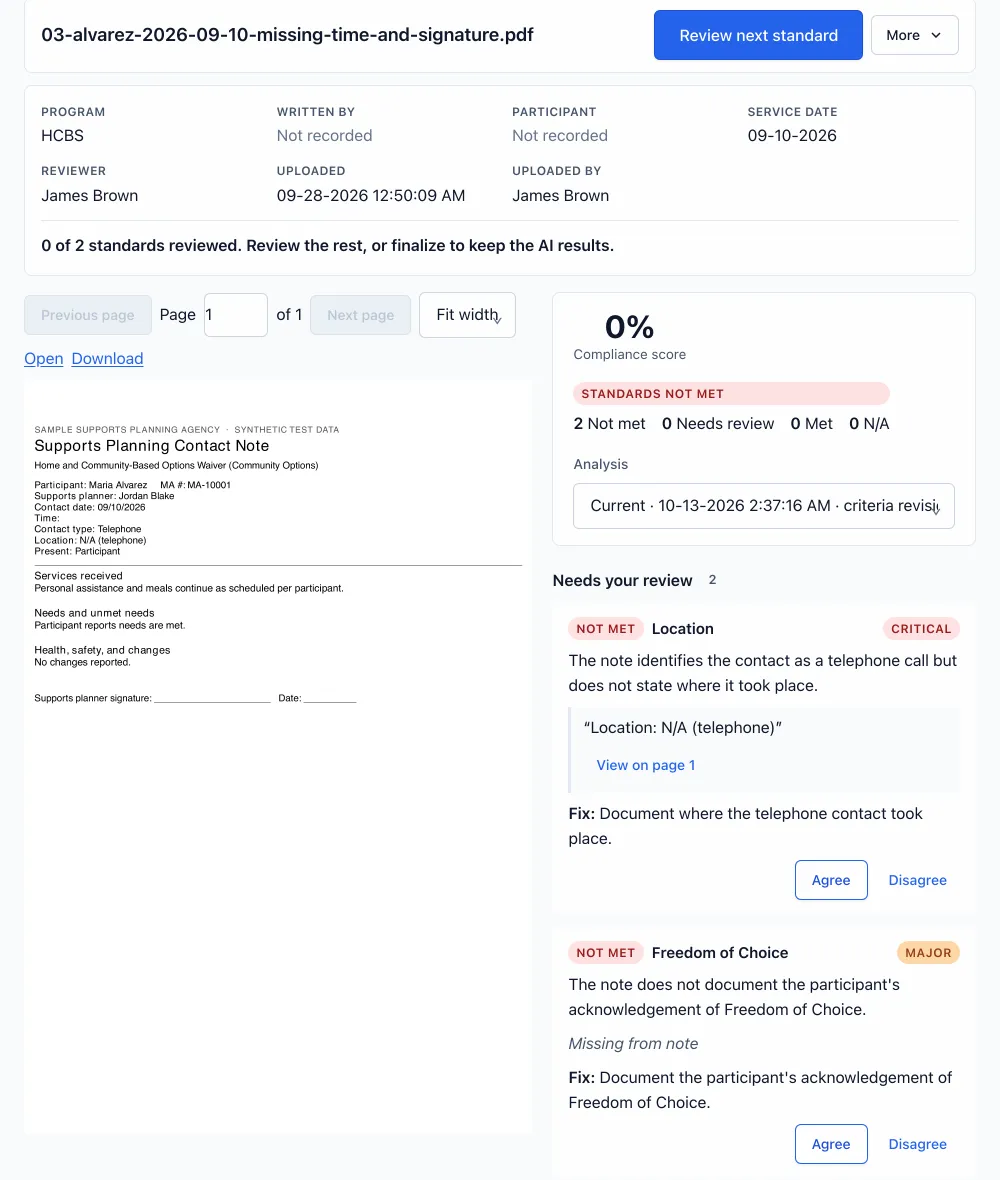
AI-assisted review helps identify possible issues. Your organization remains responsible for determining compliance, billability, and the final documentation decision.
Minnesota’s home and community-based services (HCBS) programs serve different populations. Start with the criteria your lead agency and program apply. One checklist won’t fit every waiver.
Community Access for Disability Inclusion. Coordinate supports and monitor services for eligible people with disabilities living in the community.
Developmental Disabilities Waiver. Plan and coordinate supports for eligible people with developmental disabilities or related conditions.
Brain Injury Waiver. Coordinate individualized home and community-based services for eligible people with a brain injury.
Community Alternative Care Waiver. Plan and coordinate community supports for eligible people with complex medical needs.
Elderly Waiver. Plan and coordinate supports for eligible older adults who need a nursing facility level of care and choose community services.
Alternative Care and Essential Community Supports are related Minnesota programs. DHS includes them in its case-management guidance and distinguishes their requirements from the disability waivers.
Minnesota DHS case-management guidance · Minnesota DHS federal waiver overview · Read our Minnesota documentation guide and QA checklist
Manage participants and caseloads, use configurable contact-note templates, route notes for supervisor approval or correction, and keep visit history, files, reports, and role-based permissions in one place. Keep using any state or lead-agency systems and assessments that your program requires.
If your agency bills directly, evaluate claims submission through supported clearinghouse workflows, claim tracking, denial worklists, and 835 payment reconciliation. Confirm Minnesota payer, enrollment, service code, and claim-type fit before relying on it.
View current pricing for standalone or combined workflows.
The Minnesota DHS Waiver Case Management Advisory Working Group began in July 2026. Its remit includes quality, accountability, workforce capacity, and continuity of services. Its work is advisory and does not require agencies to buy software or endorse One Care Portal.
A practical starting point is to pick one common gap and agree on what evidence supervisors should accept before changing a note or closing the review.
It helps agency staff manage caseloads, contact notes, follow-ups, and supervisor review for Minnesota waiver workflows. It is not a service for people seeking Medicaid benefits, and it does not replace required state processes.
Yes, as an internal review tool. Configure separate criteria with your team and verify them against your program and lead-agency instructions before using them.
Yes. Keep your EHR and export supported PDFs for review. Your team can make any final corrections in the system where it maintains the official record.
No direct MnCHOICES or MMIS integration is offered here. Use exported PDFs for internal review. Any other automated import would require authorized access and a separate technical evaluation.
No. It can flag possible issues and point to evidence. A qualified person must verify the findings and decide whether documentation meets the applicable requirements.
Yes. Review supported PDFs against your program’s criteria. Supervisors can verify flagged items against the source and record the disposition.
No. Continue to complete required assessments, forms, and submissions in the systems your program or lead agency specifies.
Yes. Compliance Review is available separately from Case Management and Billing. See current pricing.
Bring the payers and claim types you need to a discovery call. Submission depends on your agency’s billing eligibility, enrollment, service codes, and supported clearinghouse routes. We do not claim blanket Minnesota Medicaid billing support.
Bring a blank template and a few review criteria to a demo, or request a free review. The free-review form collects business details only. After the BAA is signed, we send a secure link for the documents you’re authorized to share.
Tell us which waiver you serve and what takes supervisors the most time. Bring a blank note or checklist and we’ll walk through that workflow. Keep participant names and protected health information out of public forms.
Have a question first? Contact us.