AI Review inside OCP
Helpful feedback while you write
When your admin enables AI Review, staff can check a contact note’s visit summary against agency instructions. Review the feedback, make edits and keep control of the final note.
Case management
Keep caseloads, contact notes, supervisor review and follow-up in one place. Built for community-based agencies, with a custom contact note for your program.
We'll confirm your program, notes and payer workflow on the demo.

See it in action
Follow a case manager from an assigned client to a contact note, supervisor feedback, and the next visit reminder.
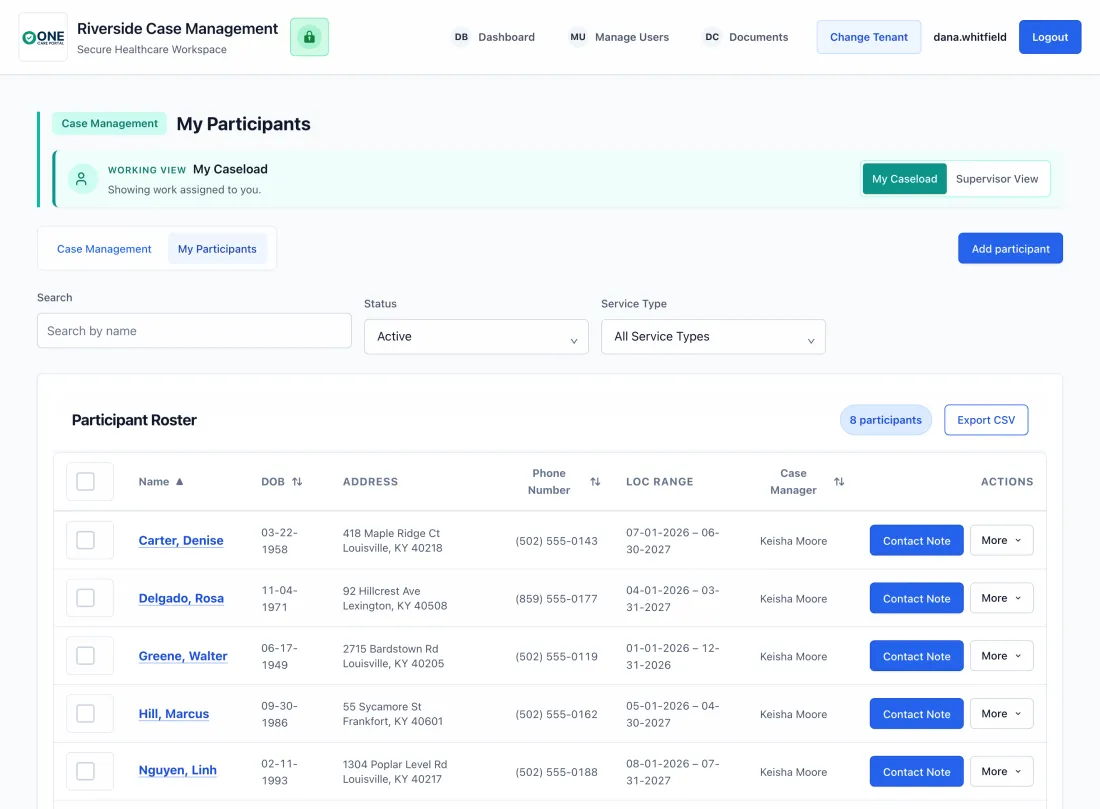
Open role-scoped assigned participants. Case managers see the participants and work available to them.
Begin from the participant list without scheduling first; scheduling remains available when the agency uses it for planning.
Authorized supervisors review eligible documentation and use the existing feedback workflow.
Configure reminders after confirming the face-to-face interval required by the agency’s program.
Want to hear from a case manager first? Watch Amy, Case Manager, QKB Case Management, share her story, or read the QKB workflow profile.
Book a 30-minute demoAI Review inside OCP
When your admin enables AI Review, staff can check a contact note’s visit summary against agency instructions. Review the feedback, make edits and keep control of the final note.
Supervisor review
Authorized supervisors review eligible notes, approve them or return them with feedback. AI Review does not replace that decision.
Review PDFs from another EHR →Manage caseloads, document services, and prepare billing-ready records. Read-only auditor access lets admins choose the case managers, participants, and contact notes an auditor can see.
Build individualized care plans with goals, interventions, and timelines. Track progress and update plans as client needs change.
Document each interaction with configurable, participant-centered workflows that connect the care plan, required reviews, follow-up work, signatures, and audit history.
Sections are configurable. Required documentation varies by agency, program, and state.
Carry approved documentation into a separate billing workflow for claim preparation, validation, submission, ERA posting, and reconciliation.
Never miss a renewal. Track authorization dates, units remaining, and get alerts before authorizations expire.
Switch between role-scoped My Caseload and Supervisor View workflows according to assigned permissions.
Review caseloads, completed work, case-manager hours, and available exports.
For case managers, care coordinators, supervisors and agency administrators managing assigned clients, documentation and follow-up.
Workflow-based fit
One Care Portal's configurable Case Management module is built for community-based agencies across the U.S. Program names and requirements vary by state, but teams with compatible assigned caseloads, plans, notes, follow-up, and supervisor review can use the same configurable workflow. In Kentucky, Michelle P. (MPW), SCL, HCB, and ABI/ABI-LTC agencies are examples. OCP designs a custom contact note for each customer’s program, in any state. See Kentucky waiver workflow fit. In Louisiana, a support coordination agency runs NOW, ROW, Children's Choice, CCW, and EPSDT caseloads in the module. See Louisiana support coordination. See Wisconsin program fit. See Alaska care coordination.
Good fit: Your case managers, caseworkers, and care coordinators are assigned participants and need one workflow for caseload visibility, documentation, follow-up, supervisor review and reporting.
Case managers and caseworkers, care coordinators, support coordinators, service coordinators, and supports planners can evaluate the same records, plans, visits, notes, and supervisor workflow. Medicaid waiver and HCBS experience informs the product; Medicaid funding is not a universal requirement.
Youth care coordinators, family support workers, community health workers, and outreach field staff may fit when they work with assigned clients and comparable documentation and review needs. The provider-side workflow brings assigned clients, documentation and review together.
OCP is not a court, probation, or detention system replacement. Jurisdiction-specific permissions, forms and reporting requirements govern implementation. Review youth-services workflow boundaries.
Different Medicaid teams need different proof: waiver case management, HCBS documentation, targeted case management, supported and supportive housing, and billing-connected care coordination. Explore the workflow for each program below.
For HCBS and Medicaid waiver teams managing plans, authorizations, documentation, and billing readiness.
Keep community-based service notes, care plans, signatures, and audit exports connected.
Support assessments, contacts, progress tracking, and Medicaid billing requirements in one workflow.
Use Case Management for participant records, housing goals, contacts, visits, authorizations, supervisor review, and billing readiness.
For Medicaid, HCBS, and other community-based teams whose staff manage assigned clients, documentation, and follow-up.
Document visits, track goals, and manage caseloads without the paperwork pile-up.
Use role-scoped views for caseloads, completed work, case-manager hours, and billing readiness.
Review visit notes, approve completed documentation, or return notes with clear feedback.
Track caseloads, completed work, case-manager hours, overdue notes, and billing readiness.
Supported and supportive housing is a Case Management use case, not a separate module.
Auditors review the records they need inside OCP, without your team exporting or emailing files.
Your admin creates an auditor login.
The admin assigns the specific case managers, participants and contact notes the auditor can see.
The auditor reviews those records read-only inside OCP.
Security controls and program-specific workflows for teams handling sensitive records.
Encryption, role-based access, and audit history support teams handling protected records.
Data is encrypted in transit and at rest.
Agency and program workflows are configurable, with a custom contact note for your program.
Review recorded actions with user and time details where available for your workflow.
Reliable cloud infrastructure with redundancy and automatic backups.
Control who sees what with granular permissions for each user role.
Written by One Care Portal · Reviewed by the One Care Portal team
Reviewed for product and workflow accuracy.
For HCBS and Medicaid waiver case management teams.
Learn moreExplore provider-side caseloads, contact notes, supervisor review, documents and reporting.
Review the workflowHousing and tenancy supports, case management and supported employment documented visit by visit.
Review the workflowVisit-based 1915(c) services billed in units. Services that require EVV keep their EVV system.
Review the workflowCaseloads, contact notes, goals, and supervisor review for recovery programs; not a clinical treatment record.
Review the workflowAutomate claims, reduce denials, and get paid faster with integrated billing.
Learn moreAttendance, daily notes, and service documentation in one place.
Learn moreSecurely store client and employee documents with expiring-document alerts and a signed BAA.
Learn moreCase Management uses a $299/month platform fee plus $7.99 per active participant. Billing and Compliance Review are optional, separately priced products.
Review pricing for your agency →One Care Portal serves HCBS and Medicaid waiver agencies, case management teams, and community-based provider organizations.
Yes. One Care Portal is designed for Medicaid and human services providers that need case notes, care plans, authorizations, billing readiness, and audit documentation in one system. Pricing is built around active participants so smaller and growing agencies can evaluate fit without buying an oversized enterprise platform.
Most agencies are live within two weeks, depending on how quickly we receive your note templates, user list and program details. Guided organization setup, role configuration, and one hands-on training are included. Email and phone support are included.
Agency and program workflows are configurable. OCP designs a custom contact note for each customer’s program, in any state.
Case managers use the web application for role-scoped access to caseloads and documentation. Native offline, GPS, and EVV workflows are not represented as standard capabilities.
Billing is a separate module. Agencies can use Case Management by itself for care operations, or connect the RCM module so approved services continue into claims, denials, ERA posting, and reconciliation.
Yes. Your admin can give an auditor a read-only login and choose exactly which case managers, participants and contact notes they can see. The auditor reviews those records inside OCP, so your team doesn't need to export or email files.
Email and phone support are included. One hands-on training is part of guided organization setup, and access or outage issues receive priority.
One Care Portal Case Management connects caseloads, service plans, contact notes, authorizations, follow-up, and supervisor review. Agency-specific forms and program rules must be confirmed before implementation.
See how One Care Portal keeps client records, visits, notes, plans, and supervisor review together. Discuss optional billing separately if your team needs it.