Built for Medicaid case management agencies

Run your case management agency in one place.

Notes, compliance and billing, together. Built for Medicaid waiver, targeted case management and support coordination programs.

We'll confirm your program, notes and payer workflow on the demo.

Each product works on its own. Start with the one your agency needs most and connect the others when you're ready; one $299 monthly platform fee covers whichever products you use. How combined pricing works
500,000+
contact notes completed
100,000+
claims submitted
5+ years
agencies have been with OCP
2 weeks
most agencies are live within

Who uses One Care Portal

  • Case management, support coordination, targeted case management and HCBS waiver agencies
  • From a new agency with its first participants to multi-site teams
  • Agencies that must keep a state system: use Compliance Review and Billing/RCM alongside it

What changed for agencies already using it

QKB Case Management 5 years with OCP · about 400 participants

Notes get finished in the field, not at night.

QKB's case managers used to write notes on paper and drive back to the office to keep files in order. Their contact note and service authorization form now live in OCP, so the note is done before they leave the participant's home.

Read QKB's story
Healthy Adult Day Healthcare 4 years with OCP · about 600 participants

Files are ready when an auditor asks.

Participant files and every employee record moved off paper and into one system. In Glenn's words: if we were ever audited, we have all the information there whenever it is necessary.

Read Healthy's story

Better Life ADHC 2 years with OCP · about 150 participants

The service note and the claim live in one system.

The case manager documents the contact once, and the billable service becomes a claim from that same note, with no re-keying. 835 payments post back into OCP so the team sees what was paid.

Read Better Life's story

Use one product, or all three together

Case Management, Compliance Review and Billing work alone or together. Here is what each one looks like in use.

01 Case management

A contact note built around your program

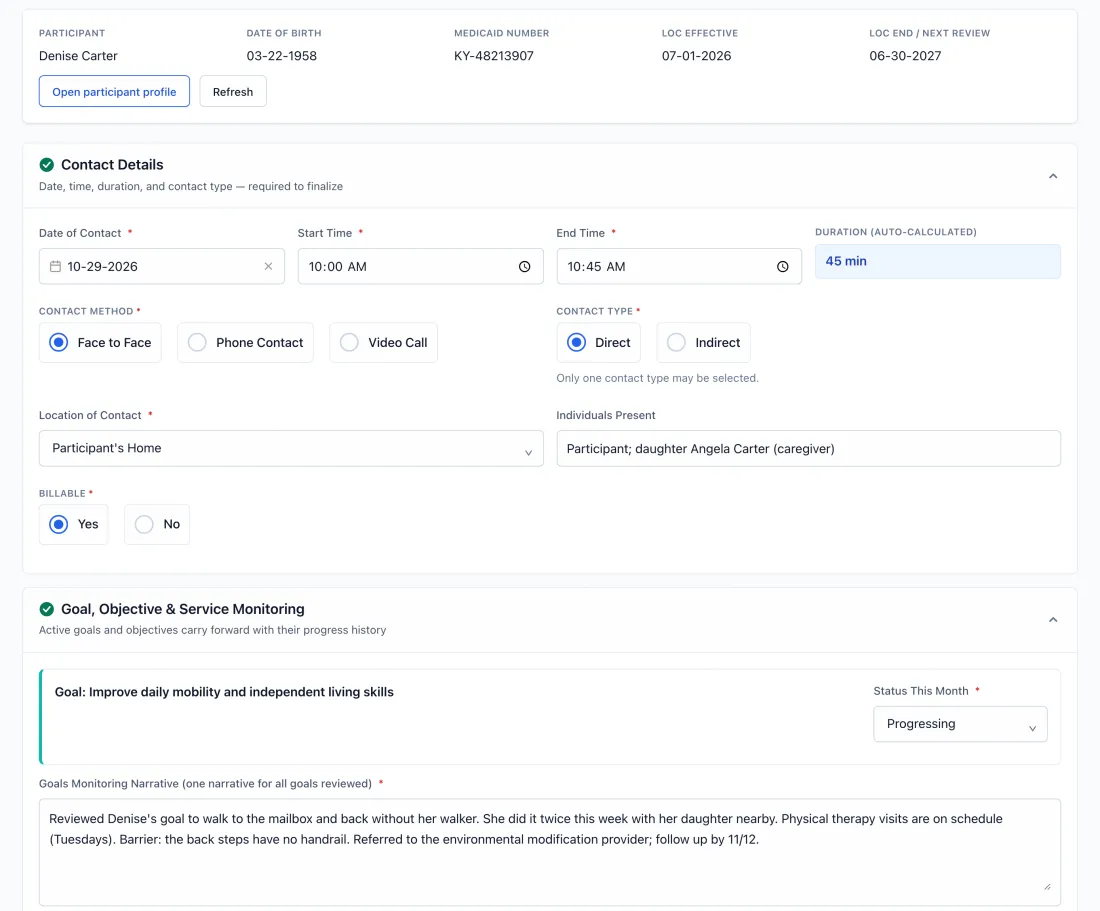
During setup we build your contact note from your waiver's requirements. Case managers work from their own caseload, finish the note during the visit, and send it to a supervisor who approves it or returns it with comments. Assigned caseloads, custom notes, plans and supervisor review sit together, with read-only auditor access for the records you choose.

Explore Case Management
Contact note for Denise Carter: a 45-minute face-to-face visit at her home with her daughter present, marked billable, with the goal of improving daily mobility marked as progressing and a goals narrative about walking to the mailbox without her walker.
One Care Portal, shown with sample agency data.
  1. Assigned caseload

    See participants assigned to you and what needs attention.

  2. Complete contact note

    Document the contact and check required fields.

  3. Supervisor review

    Review submissions and return needed follow-up.

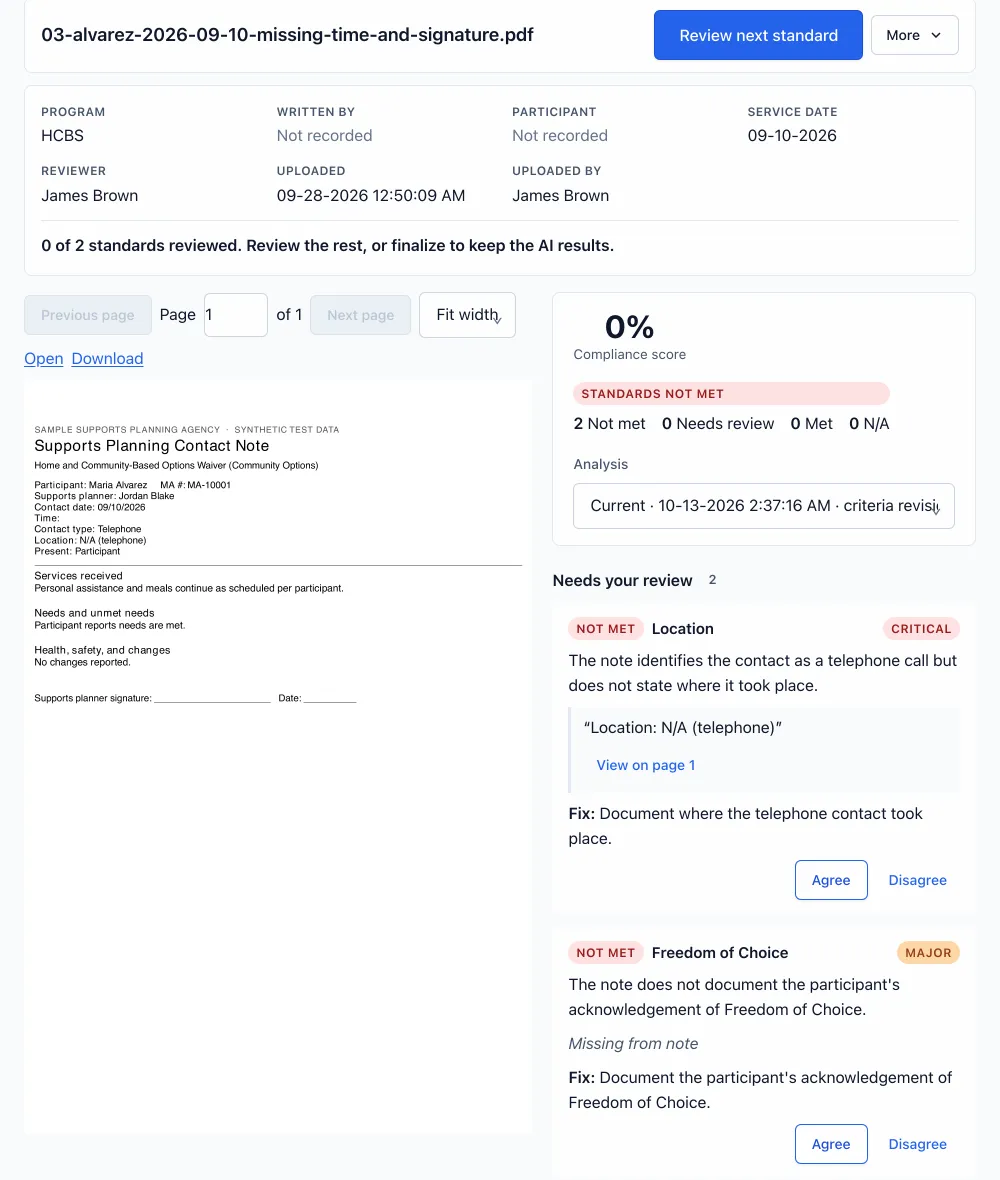
Compliance Review workspace with a supports planning contact note open beside two findings: the contact location is not documented and Freedom of Choice is missing. Each finding quotes the note, cites page 1 and waits for the reviewer to agree or disagree.
One Care Portal, shown with sample agency data.

02 Compliance review

Catch a missing note detail before an auditor does

Review PDF visit notes, chart records and assessments against your program, payer and internal QA criteria. Each finding quotes the note and links to the page it came from. Your reviewer agrees or disagrees, and nothing is final until they do.

Keep your EHR. Start with PDF upload, and we connect any EHR with API access during onboarding. Your team stays in control of every flag.

Explore Compliance Review

03 Billing / RCM

Get paid for the visits your team already documented

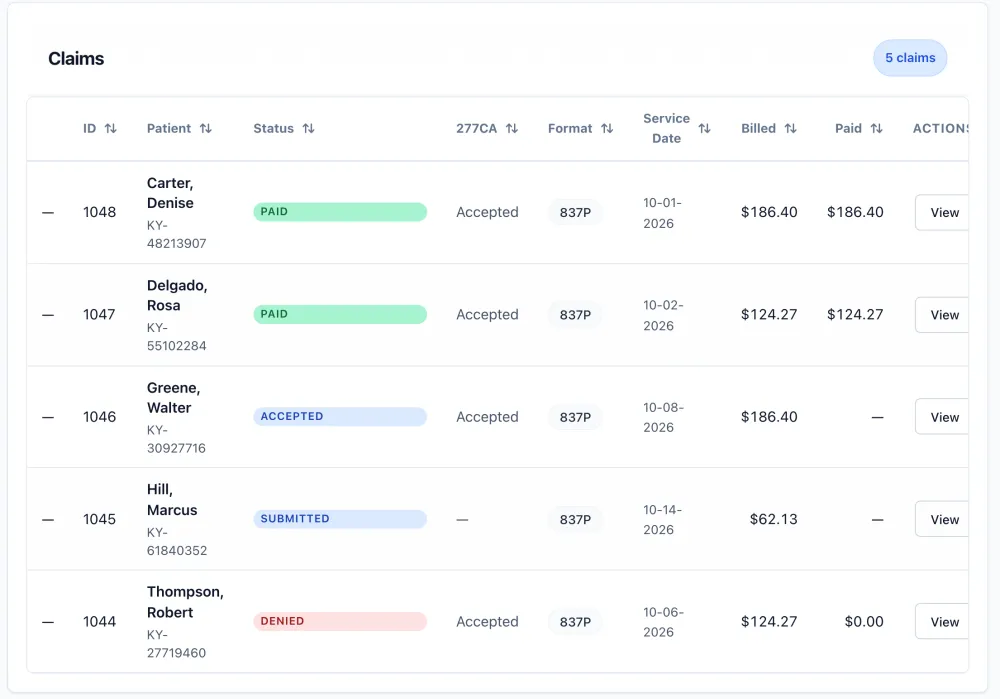
Submit claims through a clearinghouse and post 835 payments. Use Billing with your current system or connect it to OCP Case Management. The 835 ERA Dashboard is included within Billing/RCM and is also available on its own.

Explore Billing

$1.50per claim, submitted and payment posted automatically

Billing Hub claims list with five 837P claims for October: two paid in full, one accepted, one submitted and one denied, each with its 277CA status, billed amount and paid amount.
One Care Portal, shown with sample agency data.

How setup works

Most agencies are live within two weeks, depending on how quickly we receive your note templates, user list and program details.

  1. Start with your program

    We confirm your program, forms, permissions and payer workflow, then guide your organization setup.

  2. We build your contact note

    We design a custom contact note for your program and configure your team's roles.

  3. Train your team and go live

    Hands-on training is included, with email and phone support when your team needs us.

Working with agencies
in KY, GA, LA and WI.

QKB Case Management Healthy Adult Day Healthcare Better Life ADHC

Hear it from the people doing the work

“I don't ever want to go back to paper.”
Amy, Case ManagerQKB Case Management
Read the transcript

Why we built One Care Portal

One Care Portal started with case managers, not with software. Working closely with case managers and the first agencies to use it, I kept seeing the same day: a note written on paper in a participant's kitchen and typed up again at night, files pulled together the week before an audit, and the same visit keyed in twice so the agency could get paid.

We built the product around what those teams showed us, and we still work that way. When a case manager tells us a field slows them down, we change it. That is why we build each agency's contact note for its own program instead of handing everyone the same form.

Ram BastolaFounder, One Care Portal · Stedi founder spotlight

Participant records, protected the way your auditors expect

Security and access
  • HIPAA-compliant
  • BAA available
  • Encryption
  • Role-based access
  • Audit history
  • Read-only auditor access

Published prices, month to month

One $299 monthly platform fee covers whichever products you use, then you pay for usage. Training and support are included.

See full pricing

Platform fee

$299 / month

One fee for any mix of products

Case management

$7.99 per active participant

See Case Management

Compliance review

500 reviews/month included in the platform fee; larger tiers from +$300/month

View plans

Billing / RCM

$1.50 per claim, submitted and payment posted automatically

See Billing

Questions agencies ask before switching

Questions about your program or current system? We'll walk through them with you.

Ask a question
We already use another system — how hard is it to switch?

Guided organization setup, role configuration, and one hands-on training are included. Most agencies are live within two weeks, depending on how quickly we receive your note templates, user list and program details. Email and phone support are included.

Is One Care Portal only for small agencies?

No. Agencies can start with the modules and usage they need, then coordinate more staff roles, supervisor review, caseloads, documentation, billing, and reporting as they grow. Pricing remains usage-based and month to month, with no long-term contract.

Is One Care Portal really built for Medicaid programs?

Yes. One Care Portal supports Medicaid waiver and HCBS workflows with assigned caseloads, configurable contact notes, supervisor review and audit preparation tools. Confirm your program's requirements during a demo.

Can we use Compliance Review or Billing on its own?

Yes. Compliance Review works standalone alongside any system. Billing works standalone with your current system or connected to OCP Case Management.

Can an auditor review our records in One Care Portal?

Yes. Your admin can give an auditor a read-only login and choose exactly which case managers, participants and contact notes they can see. The auditor reviews those records inside OCP, so your team doesn't need to export or email files.

Can One Care Portal catch copied or duplicate notes?

Yes. The copy-paste checker flags notes copied from previous notes and duplicate notes, using rules your admin sets. Your reviewers decide what needs follow-up.

Can you use our program's contact note?

OCP designs a custom contact note for each customer's program, in any state.

See your own program in One Care Portal

Bring your program, your questions and the note you use today. We'll show you Case Management, Compliance Review and Billing in a 30-minute demo.